[1]:
try:
  import google.colab
  %pip install -q ugropy
except ImportError:
  pass
Properties estimators

Some group contribution models could be used to predict properties of pure substances. The get_groups function of PropertiesEstimator works the same as the get_groups function of the GibbsModels, for that, please refer to the GibbsModels section of the tutorial.
Joback model
The Joback model is a well known model to estimate properties of pure substances. We can use it independently of the Groups class by doing:
[2]:
from ugropy import joback

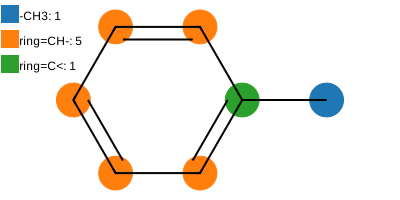
toluene = joback.get_groups("toluene")

print(toluene.subgroups)
{'-CH3': 1, 'ring=CH-': 5, 'ring=C<': 1}
[3]:
toluene.draw(width=500)
[3]:
[4]:
print(toluene.critical_pressure)
print(toluene.critical_volume)
print(toluene.critical_temperature)
print(toluene.acentric_factor)
print(toluene.fusion_temperature)
41.144119209325225 bar
319.5 centimeter ** 3 / mole
598.0611700010388 kelvin
0.25208296412216535 dimensionless
195.07 kelvin
You may notice that the attributes of the Joback class are numbers with units. This is possible thanks to the pint library. The pint library allows us to work with units in a very simple way. For example, we can convert the value of the critical_pressure attribute to pascal by doing:
[5]:
toluene.critical_pressure.to("Pa")
[5]:
If you want to obtain the raw numerical value without units, you can use the magnitude attribute:
[6]:
toluene.critical_pressure.magnitude
[6]:
np.float64(41.144119209325225)
Or combine both functionalities:
[7]:
toluene.critical_pressure.to("mmHg").magnitude
[7]:
np.float64(30860.62289092802)
For more information about the pint library, you can visit their documentation.
On the other hand, we can use the Joback class to estimate temperature-dependent properties of the molecule (also with pint units). In the API documentation, you can check the available methods to estimate temperature-dependent properties and how it’s done.
[8]:
print(toluene.vapor_pressure(110 + 273.15))
0.923433500943906 bar
[9]:
print(toluene.viscosity_liquid(25 + 273.15))
0.0004848511681835698 pascal * second
[10]:
print(toluene.heat_capacity_liquid(50 + 273.15))
174.140191226778 joule / kelvin / mole
[11]:
toluene.heat_capacity_ideal_gas(150 + 273.15)
[11]:
You can check the API documentation of the JobackFragmentationResult class to see all the properties that can be estimated.
The Joback model allows the user to provide the experimental normal boiling temperature of the substance to increase the accuracy of some properties estimations. This value will be used instead of the Joback estimated normal boiling temperature to calculate some properties, for example the critical temperature.
[12]:
toluene = joback.get_groups("toluene", normal_boiling_point=(110.6 + 273.15))
[13]:
print(toluene.critical_temperature)
593.8980798775972 kelvin
[14]:
print(toluene.vapor_pressure(110.6 + 273.15))
1.0132500000000007 bar
Abdulelah-Gani model
https://github.com/PEESEgroup/Pure-Component-Property-Estimation
The recently developed Abdulelah-Gani model is also available in ugropy. This model is in an early stage of development and it is not as complete as the original publication. Some of tertiary structures are not yet implemented and for that, the properties that depend on them are not available. Let’s see how to use it:
[15]:
from ugropy import abdulelah_gani
[16]:
adrenaline = abdulelah_gani.get_groups("adrenaline")
[17]:
adrenaline.primary.subgroups
[17]:
{'CH3': 1, 'aCH': 3, 'aC-CH': 1, 'OH': 1, 'aC-OH': 2, 'CH2NH': 1}
[18]:
adrenaline.secondary.subgroups
[18]:
{'CHm(OH)CHn(NHp) (m,n,p in 0..2)': 1,
 'aC-CHn-OH (n in 1..2)': 1,
 'AROMRINGs1s2s4': 1}
[19]:
adrenaline.tertiary.subgroups
[19]:
{}
As you can see, The Abdulelah-Gani model includes different kinds of subgropus. The primary structures works the as the other models we have discussed before. The secondary and tertiary are additional structures that are used to increase the accuracy of the estimations. Also, with secondary and tertiary structures, the model differentiates isomers. For example:
[20]:
hexa23 = abdulelah_gani.get_groups("2,3-dimethylhexane")
hexa24 = abdulelah_gani.get_groups("2,4-dimethylhexane")
[21]:
hexa23.critical_temperature
[21]:
[22]:
hexa24.critical_temperature
[22]:
[23]:
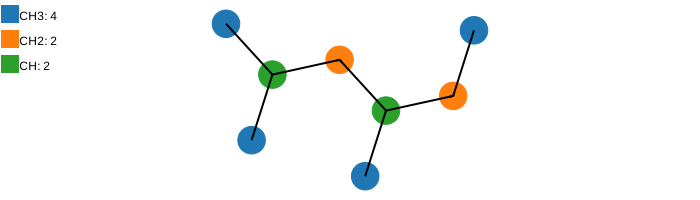
print(hexa23.primary.subgroups)
print(hexa24.primary.subgroups)
{'CH3': 4, 'CH2': 2, 'CH': 2}
{'CH3': 4, 'CH2': 2, 'CH': 2}
[24]:
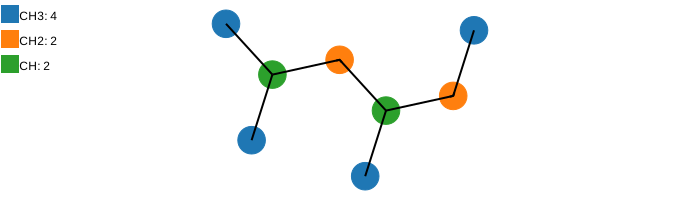
print(hexa23.secondary.subgroups)
print(hexa24.secondary.subgroups)
{'(CH3)2CH': 1, 'CH(CH3)CH(CH3)': 1}
{'(CH3)2CH': 1}
As you can see, both molecules have the same primary structure but different secondary structures. This is why the properties are different. On a Property Estimator that only have primary structures like the Joback model we would get the same properties for both molecules.
[25]:
print(joback.get_groups("2,3-dimethylhexane").critical_temperature)
print(joback.get_groups("2,4-dimethylhexane").critical_temperature)
552.9339856842008 kelvin
552.9339856842008 kelvin
All the properties that can be estimated with the Abdulelah-Gani model (implemented on ugropy) are:
[26]:
print(hexa23.critical_temperature)
print(hexa23.critical_pressure)
print(hexa23.critical_volume)
print(hexa23.acentric_factor)
print(hexa23.ig_formation_enthalpy)
print(hexa23.ig_formation_gibbs)
564.8418659474339 kelvin
26.35038783694938 bar
465.335 centimeter ** 3 / mole
0.35672642267081217 dimensionless
-214.82596509091175 kilojoule / mole
15.59002996305599 kilojoule / mole
If you refer to the original publication you will notice that the Abdulelah-Gani model allows to estimate the properties by two methods:
GC-SIMPLE: Algebraic correlations
ML: trained neural networks
ugropy evaluates the properties using the GC-SIMPLE method. The ML method is not provided in this library. To learn how evaluate the properties with the ML method, please refer to the original publication supplementary material:
https://github.com/PEESEgroup/Pure-Component-Property-Estimation
However, ugropy helps you a little to evaluate the trained neural networks. The fragmentation results give you the numpy array needed to evaluate the ML model ready to use:
[27]:
hexa23.ml_vector
[27]:
array([[4, 2, 2, 0, 0, 0, 0, 0, 0, 0, 0, 0, 0, 0, 0, 0, 0, 0, 0, 0, 0, 0,
        0, 0, 0, 0, 0, 0, 0, 0, 0, 0, 0, 0, 0, 0, 0, 0, 0, 0, 0, 0, 0, 0,
        0, 0, 0, 0, 0, 0, 0, 0, 0, 0, 0, 0, 0, 0, 0, 0, 0, 0, 0, 0, 0, 0,
        0, 0, 0, 0, 0, 0, 0, 0, 0, 0, 0, 0, 0, 0, 0, 0, 0, 0, 0, 0, 0, 0,
        0, 0, 0, 0, 0, 0, 0, 0, 0, 0, 0, 0, 0, 0, 0, 0, 0, 0, 0, 0, 0, 0,
        0, 0, 0, 0, 0, 0, 0, 0, 0, 0, 0, 0, 0, 0, 0, 0, 0, 0, 0, 0, 0, 0,
        0, 0, 0, 0, 0, 0, 0, 0, 0, 0, 0, 0, 0, 0, 0, 0, 0, 0, 0, 0, 0, 0,
        0, 0, 0, 0, 0, 0, 0, 0, 0, 0, 0, 0, 0, 0, 0, 0, 0, 0, 0, 0, 0, 0,
        0, 0, 0, 0, 0, 0, 0, 0, 0, 0, 0, 0, 0, 0, 0, 0, 0, 0, 0, 0, 0, 0,
        0, 0, 0, 0, 0, 0, 0, 0, 0, 0, 0, 0, 0, 0, 0, 0, 0, 0, 0, 0, 0, 0,
        1, 0, 1, 0, 0, 0, 0, 0, 0, 0, 0, 0, 0, 0, 0, 0, 0, 0, 0, 0, 0, 0,
        0, 0, 0, 0, 0, 0, 0, 0, 0, 0, 0, 0, 0, 0, 0, 0, 0, 0, 0, 0, 0, 0,
        0, 0, 0, 0, 0, 0, 0, 0, 0, 0, 0, 0, 0, 0, 0, 0, 0, 0, 0, 0, 0, 0,
        0, 0, 0, 0, 0, 0, 0, 0, 0, 0, 0, 0, 0, 0, 0, 0, 0, 0, 0, 0, 0, 0,
        0, 0, 0, 0, 0, 0, 0, 0, 0, 0, 0, 0, 0, 0, 0, 0, 0, 0, 0, 0, 0, 0,
        0, 0, 0, 0, 0, 0, 0, 0, 0, 0, 0, 0, 0, 0, 0, 0, 0, 0, 0, 0, 0, 0,
        0, 0, 0, 0, 0, 0, 0, 0, 0, 0, 0, 0, 0, 0, 0, 0, 0, 0, 0, 0, 0, 0,
        0, 0, 0, 0, 0, 0, 0, 0, 0, 0, 0, 0, 0, 0, 0, 0, 0, 0, 0, 0, 0, 0,
        0, 0, 0, 0, 0, 0, 0, 0, 0, 0, 0, 0, 0, 0, 0, 0, 0, 0, 0, 0, 0, 0,
        0, 0, 0, 0, 0, 0]])
To visualize the fragmentation results you can use the draw method for each structure type:
[28]:
hexa24.primary.draw(width=700)
[28]:
[29]:
hexa24.secondary.draw(width=700)
[29]:
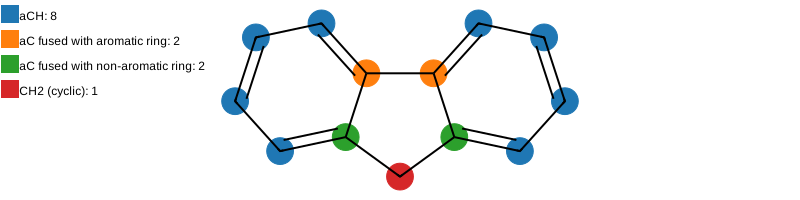
The example molecules doesn’t have tertiary structures, let’s get the solution for a molecule that has tertiary structures:
[30]:
fluorene = abdulelah_gani.get_groups("9H-Fluorene")
[31]:
fluorene.primary.draw(width=800)
[31]:
[32]:
fluorene.tertiary.draw(width=800)
[32]:
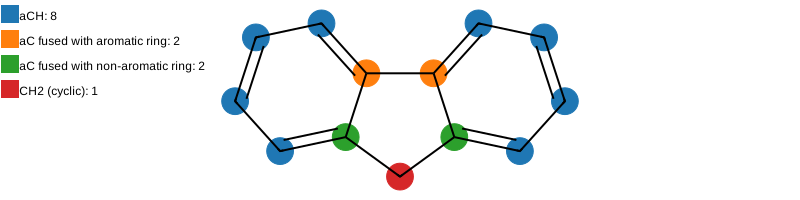
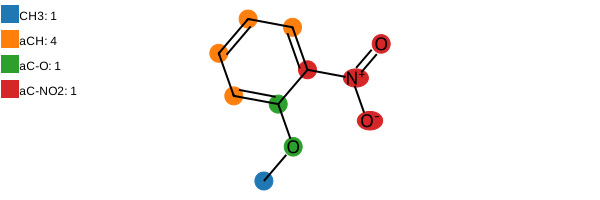
Finally, getting multiple solutions. Secondary and tertiary structures can be overlapped so they doesn’t generate multiple solutions. But of course, the primary structures will generate multiple solutions. Let’s see an example:
[33]:
mol = abdulelah_gani.get_groups("COc1ccccc1N(=O)=O", "smiles", search_multiple_solutions=True)
[34]:
mol[0].primary.draw(width=600)
[34]:
[35]:
mol[1].primary.draw(width=600)
[35]:
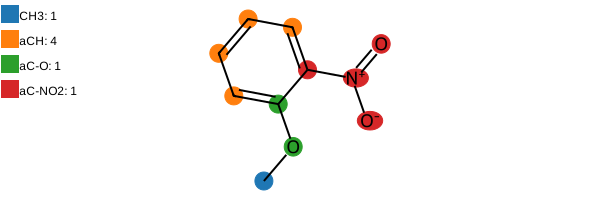
Both solutions have the same secondary and tertiary results, but different primary fragmentations. This is why the properties are different.
[36]:
mol[0].critical_temperature
[36]:
[37]:
mol[1].critical_temperature
[37]:
What a difference!! In this case, the second solution provides a much better estimation of the critical temperature (782 K). You can check it by yourself on the publication original dataset.